Cat Tiles: Cute Piano Game
- 4.5
- Rating
- 10.00M
- Installs
- Free
- Price
 Analysis by App-foxy
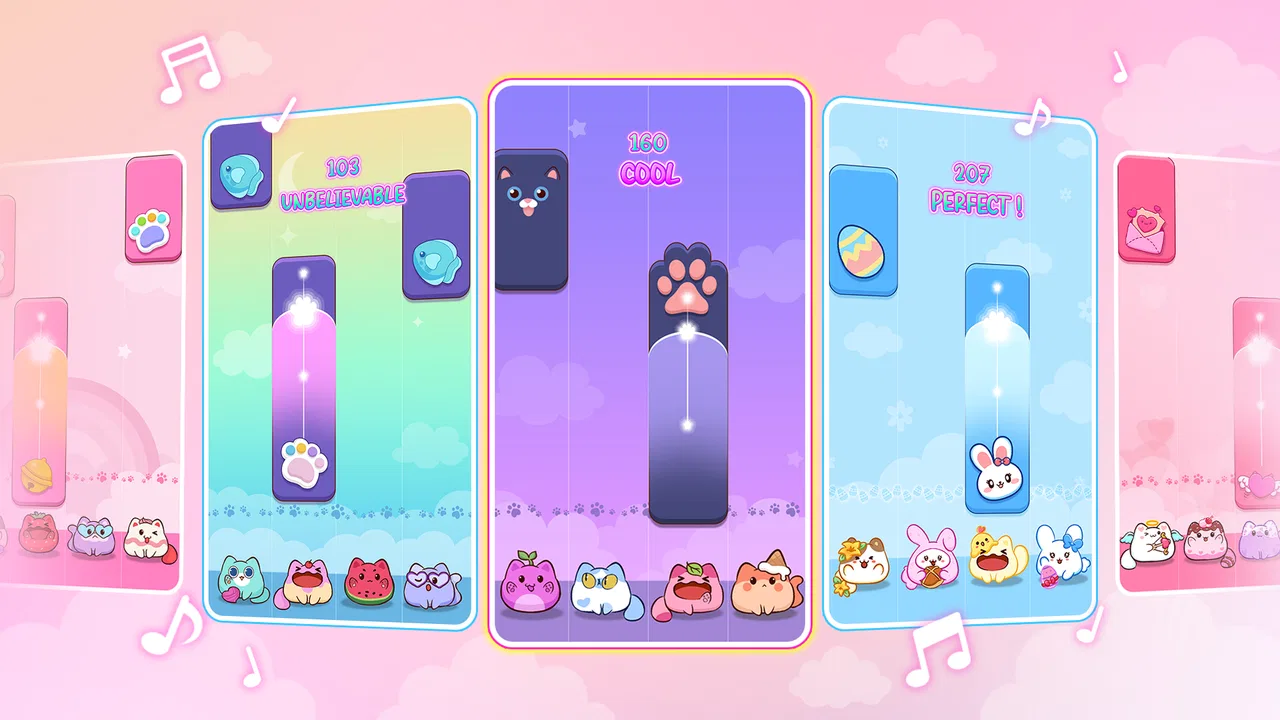
Cat Tiles: Cute Piano Game is the kind of music game I can open for a quick break without needing a tutorial or a serious time commitment. The idea is immediately readable: tap the piano-style tiles in rhythm while a succession of cute cats turns a simple reflex challenge into something more playful. After spending time with it, I found the appeal less about becoming a musician and more about finding a comfortable flow between sound, timing, and visual movement.
That distinction matters. This is not a piano-learning app, and I would not choose it when I want sheet music, lessons, or a realistic keyboard. It is a casual Android game from WingsMob, listed in the music category and available free of charge. Its Everyone age rating also makes it easy to recommend for shared family use, although younger players may still need help with the pressure of fast tapping.
How the cat-themed piano play feels in everyday use
My first impression was that the game understands the value of a very small learning curve. You see the tiles, hear the music, and begin tapping. That makes it suitable for the moments when I have only a few minutes: waiting for an appointment, taking a short break from work, or winding down before bed. I do not have to remember a complicated control layout, and the portrait-style tapping format feels natural on a phone.
You May Also Like

 Blood Strike: 2.5 Anniversary
Blood Strike’s Loadouts Turn Every Drop Into a Tactical Gamble
A close look at Blood Strike’s custom loadouts: how fast access to signature weapons reshapes its battle royale rhythm, rewards preparation, and narrows the gap between fights.

 Pandora - Music & Podcasts
Pandora’s Music Is Easy to Start, but Harder to Recover
Pandora’s strength is its low-effort path from a seed to a station. Its weak spot is how much confidence it asks you to place in connection, setup, and quiet recovery.

 8 Ball Pool
 Is Built on Rivalries, Rematches, and Routine
A close look at the rivalries, rematches, shared routines, and unanswered safety questions that turn a quick pool match into a persistent mobile community.

 Samsung Music
’s Quiet Strength Is Playing What You Already Own
Its reach comes less from spectacle than from dependable access to a personal library. That simplicity is both the app’s strongest retention engine and its ceiling.

 AccuWeather: Weather Radar
AccuWeather Review: A Quick, Clear Forecast for Everyday Decisions
For everyday plans, the best forecast is the one you can understand quickly. AccuWeather makes rain timing, radar, and local conditions easy to act on, with a few trade-offs.

 Hill Climb Racing
Why Hill Climb Racing Still Turns Crashes Into One More Run
A tiny car, a bumpy hill and one more upgrade: Hill Climb Racing keeps resurfacing because its simple chaos makes every near-miss feel personal.
More From Our News Desk
View All News


The cat presentation gives the game a softer personality than a plain rhythm test. The visual theme is cheerful rather than intense, so the experience feels closer to a light arcade toy than a demanding music simulator. That is a good match for players who like cute mobile games but still want something that rewards concentration. The music provides the pace, while the tiles give my hands a clear job to do.
At the same time, simple controls should not be confused with effortless play. The challenge comes from maintaining attention as the sequence continues. A missed tap can interrupt the rhythm and make the next few moments feel more difficult, especially when I have started tapping automatically instead of watching carefully. I found it better to focus on the incoming pattern rather than stare at the cats or treat the game as background entertainment.
One useful habit is to play with the phone held steadily in both hands when the pace becomes demanding. Using one thumb is comfortable at the beginning, but it can become awkward when tiles appear across a wider area. Two-handed tapping gives me more reach and reduces the chance that my hand covers the next target. This is a small adjustment, but it changes the experience more than I expected.
The game works best when I treat each run as a short concentration exercise. I do not need to play for a long session to feel progress. A few attempts let me identify whether I was reacting late, looking away from the play area, or tapping from memory instead of responding to what was actually on screen. That makes the title easy to fit into a daily routine, even for someone who rarely plays mobile games.
What progress feels like when the pressure rises
The most satisfying part is the gradual improvement in timing. At first, I tend to react to individual tiles. With practice, I begin to anticipate the rhythm and keep my eyes slightly ahead of my fingers. That shift makes the game feel more musical, even though I am not playing a real keyboard. The reward is not just a higher result; it is the feeling that my hands and ears are finally working together.
There is also a useful trade-off between speed and control. Tapping too cautiously can make me fall behind, but tapping too aggressively creates mistakes that were avoidable. I get better results when I keep a consistent touch rather than trying to chase every tile with sudden movements. For new players, this is probably the most practical tip: build a steady rhythm first, then work on faster reactions.
Players who enjoy score chasing may find enough tension in repeating a section and trying to improve their execution. However, I would not describe this as a deep progression game based on the information and experience available to me. Its main loop is the act of playing accurately and trying again. If you need a large role-playing system, character development, or a long-term collection goal, this will likely feel too focused.
The pressure is also personal rather than social in the way I experienced it. I play against my own mistakes and previous performance, not because the game creates a dramatic competitive atmosphere around every attempt. That makes it approachable, but it also means the experience may lose its pull once the novelty of the cat theme and tapping rhythm wears off.
A practical way to avoid frustration is to stop after a few poor attempts instead of tapping through irritation. Rhythm games punish tense hands and divided attention. When I pause for a minute and return with a relaxed grip, the same sequence often feels more manageable. This is especially relevant for children, who may interpret a missed run as failure rather than as normal practice.
Fairness, spending, and the limits of what I can judge
Because the game is free, the natural question is whether playing comfortably depends on spending. I would be careful here: the confirmed product details establish that the download costs nothing, but they do not establish a full purchase structure or guarantee that every part of the experience is free. I would therefore install it expecting free access to the game, while checking the in-app screens myself before allowing a child to play unsupervised.
That is not a criticism of this particular developer; it is simply the sensible way to approach any free mobile game. A free download can still present optional purchases, advertising, or other interruptions, and those details should be judged from the actual current app experience rather than guessed. I would not promise a completely purchase-free session to a friend without checking those screens first.
From a fairness perspective, the central skill is at least easy to understand: success depends on tapping the moving piano tiles with appropriate timing. That is preferable to a game where the basic challenge is hidden behind complicated systems. Still, I cannot make a firm claim that every mode, song, visual item, or progression element is equally accessible without spending, because that would go beyond what can be responsibly confirmed.
My advice is to separate two questions. First, does the free core provide enough enjoyable tapping for a short session? Second, do any optional interruptions or purchases change how long you want to continue? For a casual player, the answer to the first question may be enough. For someone looking for a completely predictable experience for a child, it is worth inspecting the purchase prompts and device settings before handing over the phone.
The same caution applies to competitive fairness. A score-based music game feels fair when the result reflects timing and attention rather than access to paid advantages. Cat Tiles: Cute Piano Game has a clear skill-based surface, but I would not label its entire competitive structure fair or unfair without verified details about rankings, boosts, or purchasable benefits. If competition is your main reason for downloading, treat that as something to evaluate directly rather than assuming it works like a dedicated esports rhythm title.
For relaxed personal play, this uncertainty is less important. I can enjoy the tapping loop without caring about a leaderboard. For a player who wants to compare results seriously with friends, it becomes more important to know how scores are produced and whether all players face the same conditions. That is one of the clearest situations where a more established competitive rhythm game may be a better fit.
Who will enjoy it, and who should choose something else
I would recommend this game to people who like cute presentation, quick music challenges, and controls that can be understood immediately. It is particularly suitable for casual players who want a small activity between other tasks. The Everyone rating supports its broad accessibility, while the cat theme gives it an inviting tone for younger players and adults who prefer friendly visuals over aggressive arcade design.
It is also a reasonable choice for someone testing whether rhythm games are enjoyable before committing to a more complex title. You do not need musical knowledge to start, and mistakes are easy to understand because they happen at the point of tapping. The game can act as a gentle introduction to timing-based play, even though it should not be treated as a substitute for learning piano.
I would skip it if your priority is genuine instrument practice. The tile system may improve hand-eye coordination and rhythmic attention, but it does not teach finger placement, scales, reading notation, or expressive control. A piano-learning application with lessons and a keyboard interface would be more useful for that goal.
I would also look elsewhere if you want a large narrative, deep customization, or a carefully documented competitive ecosystem. Cat Tiles is strongest as a compact arcade experience. Expecting it to deliver the breadth of a full rhythm platform or the educational value of a music tutor would create disappointment that the game itself does not need to carry.
Compared with a conventional piano simulator, this title is easier to pick up but much less realistic. Compared with a serious rhythm game, it feels friendlier and less intimidating, but potentially less substantial for expert players. Compared with a generic endless-tapping game, the musical framing gives my actions a clearer sense of timing. Those differences explain its audience better than the cat artwork alone.
Version, accessibility, and practical expectations
The current version is 2.2.11, and the listed minimum operating system is Android 7.1. That makes the game relevant to people using older compatible Android devices instead of only recent phones. Even so, rhythm games are sensitive to touch response and screen performance. A phone that handles ordinary apps well may still feel less comfortable if taps register late or the display becomes crowded.
Before judging your own ability, I would check the basics: keep the screen clean, close demanding background apps, and play in a position where your fingers do not block the next tiles. These are not glamorous tips, but they matter in a timing game. A missed input caused by an awkward grip feels very different from a genuine timing mistake, and separating the two helps you decide whether the game suits your device.
The game has attracted a broad audience, with an average rating of 4.6 from around 21 thousand ratings and more than 10 million installs. Those figures suggest that the basic concept has reached many players, but popularity should not replace personal testing. Some people will love the quick tapping loop, while others will find repeated attempts too narrow after the first sessions.
Its release date was October 27, 2023, which places it in a modern mobile-game context without making it feel dependent on a particular trend. The developer, WingsMob, presents a small, focused music game rather than a complicated multi-genre package. I appreciate that clarity: I know I am opening it for timing and light entertainment, not for a hidden simulation or a long story campaign.
The questions I would answer before installing
If you are wondering whether musical ability is required, my answer is no. The useful skills are visual attention, reaction speed, and keeping a steady rhythm. Someone who has never touched a piano can understand the interaction quickly. Musical experience may help with anticipating beats, but it is not a requirement for enjoying the basic challenge.
If you are asking whether it is suitable for children, the Everyone rating makes it broadly appropriate from a content standpoint. I would still consider the child’s tolerance for fast repetition and check any purchase or interruption screens on the device. A child may enjoy the cats immediately but become frustrated when the pace demands more concentration than expected.
If you are asking whether it can replace piano practice, it cannot. It may make rhythm and timing feel more familiar, but the skills transfer only in a limited way. For learning an instrument, use a dedicated educational tool. For a playful tapping session with musical feedback, this is the better match.
If you are asking whether it is worth trying when you dislike competitive games, I think it can be. The core loop works as a personal challenge, and you can focus on improving your own consistency. If you need social competition to stay interested, however, the experience may not hold your attention for long unless its competitive elements match what you want.
Finally, if you are asking whether “free” means the entire experience is guaranteed to be free of purchases, I would not make that assumption. The app itself is free to download, but I would inspect the current in-game options and use appropriate device controls. That is the fairest answer because it avoids promising a spending model that has not been established.
My trust verdict after looking past the cute theme
What I trust about Cat Tiles: Cute Piano Game is the straightforward relationship between its presentation and its main appeal. It looks friendly, starts quickly, and asks me to concentrate on tapping piano-style tiles in time. It does not need a complicated explanation to make sense, and that makes it easy to recommend as a casual music game.
What keeps my recommendation measured is the limited depth of the concept and the need to check the real spending environment before treating it as a fully carefree family game. I also would not use its rating, audience size, or cat theme as proof that it is the right choice for everyone. Serious musicians, competitive rhythm specialists, and players seeking long-term progression have stronger alternatives elsewhere.
My honest recommendation is to try it for short, focused sessions rather than expecting a complete music experience. If you want a free starting point, approachable tapping, and a cheerful cat identity, it is an appealing option. If your priorities are transparent competition, structured learning, or a substantial progression system, compare it with a dedicated alternative before settling in.
For me, the game earns its place as a small pick-up-and-play title. Its best use is a few minutes of rhythmic concentration when I want something more engaging than passive scrolling but less demanding than a full game. The free entry, broad age rating, and accessible controls make that first step easy; the decision to keep playing should depend on whether the repeated tapping remains satisfying after the novelty fades.
FAQs for Cat Tiles: Cute Piano Game
01What is Cat Tiles: Cute Piano Game about?
Cat Tiles: Cute Piano Game is a fun and engaging rhythm game where players tap on piano tiles to create music while adorable cat characters dance along. The game combines elements of music creation with a whimsical cat theme, making it perfect for both music enthusiasts and cat lovers alike.
02Is Cat Tiles: Cute Piano Game suitable for all ages?
Yes, Cat Tiles: Cute Piano Game is designed to be family-friendly and suitable for all age groups. Its intuitive gameplay and charming visuals make it an enjoyable experience for children, while its challenging levels can entertain older players who appreciate rhythm games.
03Does Cat Tiles: Cute Piano Game require an internet connection?
Cat Tiles: Cute Piano Game can be played offline, making it convenient for users who might not always have access to the internet. However, certain features, such as leaderboards and updates, may require a connection to fully enjoy the game's community aspects and latest content.
04Are there in-app purchases in Cat Tiles: Cute Piano Game?
Yes, Cat Tiles: Cute Piano Game offers in-app purchases. Players can buy additional content such as new songs, themes, and characters. While these purchases enhance the gameplay experience, they are optional, and the core game can still be enjoyed without any purchases.
05What platforms is Cat Tiles: Cute Piano Game available on?
Cat Tiles: Cute Piano Game is available on both Android and iOS devices. You can download it from the Google Play Store or the Apple App Store, ensuring accessibility for a wide range of smartphone and tablet users who want to enjoy this delightful musical adventure.
Pros
- Adorable graphics and animations.
- Simple
- intuitive gameplay.
- Wide variety of songs.
- Frequent updates with new content.
- Offline mode available.
Cons
- Limited customization options.
- In-app purchases can be pricey.
- Repetitive for advanced players.
- Ads can be intrusive.
- Requires storage space for downloads.

Cat Tiles: Cute Piano Game
Gallery